StreamProof, OBS and Clean Clips: A Rob Run Recording Guide
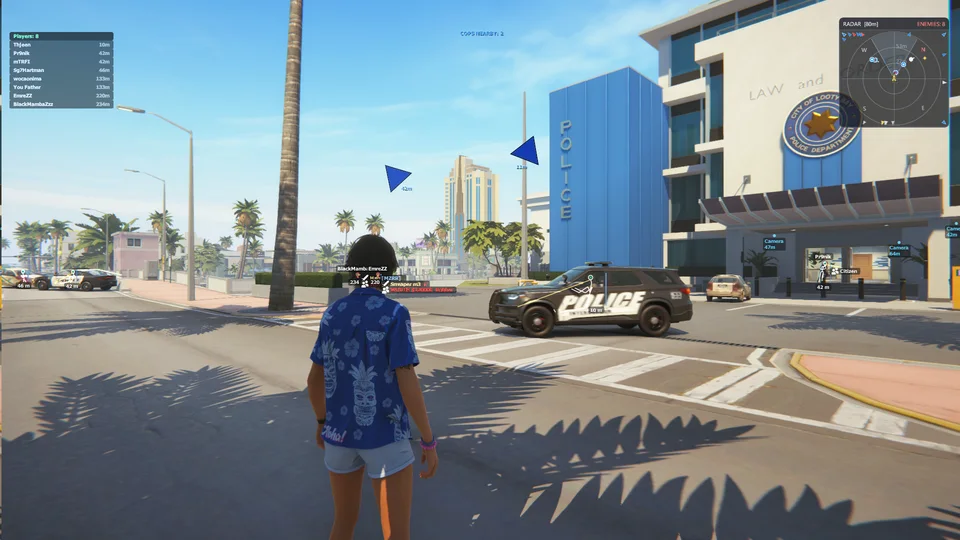
Plenty of people in our community record their heists or stream to friends on Discord, and the question we hear most is simple: will the boxes show up on my video? Here at AimRobRun we want you to know exactly what StreamProof covers, what it leaves alone, and how to set up your capture so nothing slips through. We will also be honest about the part no setting can fix, which is how you play on camera.
Two Separate Jobs: The Overlay and Your Behaviour
Recording with Elysium RR running means handling two things. First, the overlay must stay out of the captured image. StreamProof takes care of that. Second, your play has to look normal once the labels are gone, because anyone watching sees only the game. That second job is entirely yours, and we cover it further down.
StreamProof Explained
You will find StreamProof on the Weapon tab. When ticked, it sets a Windows flag on our overlay window that marks it as off-limits to capture. Password managers and banking apps rely on the very same system option so their windows stay blank in screenshots. Once it is active, OBS, Discord screen share and similar tools record the game beneath the overlay, with no boxes, labels, radar or menu.
Nothing changes on your own monitor. You still see every marker. Only the copy sent to the recording software is clean. Our advice is to keep it switched on for every session where capture software might be running.
Setting Up a Test Recording
Before your first stream, spend a couple of minutes checking the result:
- Pick your capture type - add the same OBS source you will really use, game capture or display capture. They can behave differently, so test the one you plan to stream with.
- Record a short clip - start a local recording rather than going live.
- Open and close the menu - press Home, move a slider or two, then hide it again.
- Walk near other players - so boxes, names and tags appear on your screen.
- Watch it back - stop the recording and play the file.
If any part of the overlay appears in playback, unload with F9, make sure StreamProof is ticked, save it on the Config tab, and run the test again.
If Your Frame Rate Drops
On some PCs, StreamProof lowers FPS a little while the menu is closed. It does not happen on every system, and the size of the drop depends on your hardware. A few ways to win frames back:
- Compare your FPS with the menu closed before and after enabling StreamProof, so you know the real cost.
- Turn down one heavy in-game graphics setting, shadows being the usual candidate.
- Close browser tabs and other overlays you are not using.
- Record at your monitor's native resolution instead of making OBS rescale.
A few lost frames are a fair price for footage that shows nothing it should not.
What Viewers Will and Will Not See
- Boxes, labels, radar, world markers and the menu - hidden from capture with StreamProof on.
- Custom Crosshair - the dot or cross from the Misc tab is drawn by the overlay, so it is hidden as well. Viewers see only the crosshair the game draws, which means your aim still needs to look sensible without yours.
- FOV Changer (60 to 160) - visible. It changes the game camera itself, so a stretched wide view lands in the video. Something around 90 to 100 passes as a normal preference; 160 makes every clip look odd.
- Zoom Key - visible too. Zooming in without a scope stands out to anyone watching closely.
Turning off the FOV changer, or unloading with F9, restores your original camera values.
No Flash: Untested and Screen-Only
No Flash clears the bright white blinding effect from your view. The menu still lists it as untested, so think of it as experimental. The bigger point is that it changes only what you see. The server still counts you as blinded. A clip of you shooting accurately through a flash shows a player doing something they should not be able to do. On recordings, we suggest acting blinded: step back and wait it out.
Habits for Believable Footage
Hiding the overlay does nothing to hide your decisions. These are the moments that make viewers and other players suspicious:
- Pre-aiming hidden corners - check around like any player would before turning toward a cop you could not have seen.
- Following people through walls - rest your crosshair somewhere natural while someone moves behind cover.
- Fast snaps - keep aim smoothing moderate and the circle small. Our aim assist settings guide has values that hold up on video.
- Early roulette reactions - Elysium RR displays the winning number roughly 15 s ahead of the in-game reveal. Celebrating or betting strangely before the wheel stops is an obvious tell.
- Beelining to cargo or loot - drive a path a normal player could justify from the street in front of them.
- Voice chat callouts - your microphone is not covered by StreamProof. Do not call out information you could not know.
Battle Mode helps here as well. With fewer labels on screen during a fight, there is less temptation to react to things your audience cannot see.
Streamer Checklist Before Going Live
- Loader opened with admin rights and your key accepted, game launched from Steam, then F7 or F8 once you stand on the map.
- StreamProof on and saved.
- Test recording watched back.
- FOV on an ordinary value.
- Aim settings toned down for the session.
- F9 before closing the game, every single time.
The Limits, Plainly
Its whole job is keeping our drawings out of the recorded picture. The game server is unaffected, and a report built on suspicious movement or timing is just as possible with it on. Using any cheat can cost you the account, and a clip works against you as easily as for you. Our staff explain the wider picture on the cheat safety page and in the ban questions FAQ. To check which menu options alter the real game camera, browse our complete features list. If you have any questions at all about your capture setup, feel free to reach our staff through support.