Elysium RR Aim Assist Settings Our Staff Actually Use
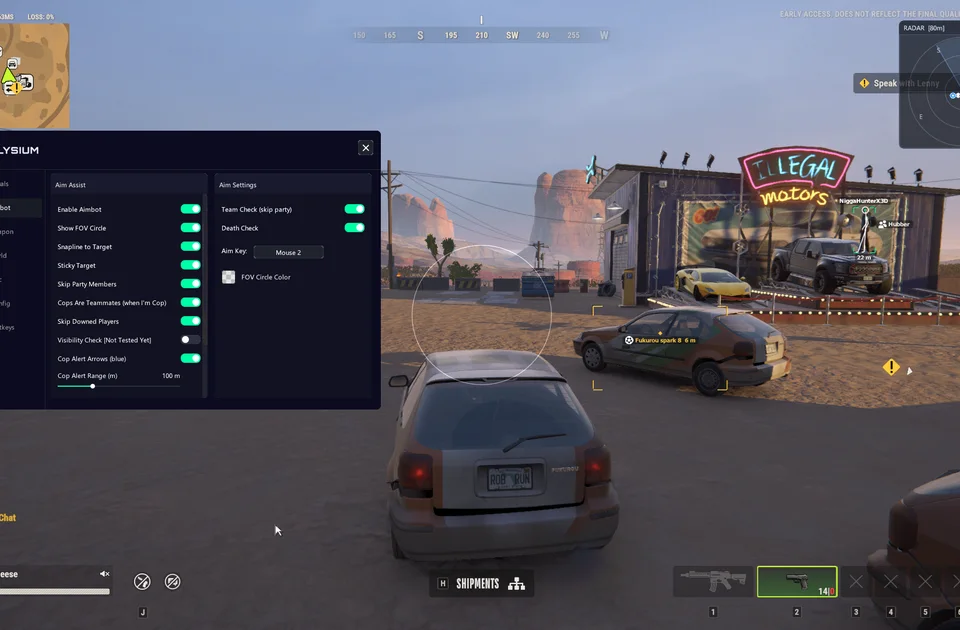
Here at AimRobRun, the Aimbot tab gets more questions in our support channel than any other part of the menu. Most of them come down to the same thing: people turn every slider to the maximum, get clips that look robotic, and then wonder why other players report them. This guide goes through each control on the tab, explains what it really changes, and gives you a starting profile you can adjust from there.
How Aim Assist Works in Elysium RR
When you hold your aim key, the program looks at every valid player inside the FOV circle, chooses one, and moves your mouse toward a bone on that player. The movement goes through as normal mouse input. Elysium RR writes nothing into game memory, and you still pull the trigger yourself. The server then decides whether the bullet landed.
Because of this design, a few things are off the table. Silent aim and backtrack are missing on purpose. Both need code running inside Rob Run itself, and our product sits outside it. If a wall is in the way, your shot hits the wall. Line of sight matters just like it does for everyone else.
The Aimbot Tab at a Glance
Here is every option you will find, in plain words:
- Bone - Head, Neck, Chest, Pelvis, or closest bone.
- Smoothing - how gradually the mouse travels. Higher feels slower and more natural.
- FOV Circle - the area around your crosshair where targets count, optionally drawn in a colour you pick.
- Max Aim Distance - ships at 70 m.
- Target Priority - crosshair, distance or lowest HP.
- Sticky Target - holds on to its first pick until that player leaves the circle or you release the key.
- Snapline - a line to whoever is selected.
- Filters - a group of checks that remove friends, downed players, dead bodies and fellow cops from selection (covered in detail further down).
- Cop Alert Arrows - not an aiming tool as such. Blue markers at the border of your view show which direction nearby police are in, within a distance you choose.
- Prediction - present in the menu, but we tell everyone to keep it off (explained below).
A Starting Profile You Can Build On
Copy this first, play a handful of fights, then change one value at a time:
- Bone: Chest.
- Smoothing: somewhere in the middle of the slider, so your own hand can still steer.
- FOV Circle: only a little wider than the gap in your crosshair. Draw it while tuning, hide it later if you prefer.
- Max Aim Distance: leave it on 70 m.
- Priority: crosshair.
- Sticky Target: on.
- Skip Downed Players, team check, skip party members, death check: on.
- Prediction: off.
- Press Save Config on the Config tab so all of this lands in settings.ini.
Choosing the Right Bone
Chest is the most forgiving choice for street fights and moving targets, and it does not produce the head-only kill pattern that spectators notice straight away. Neck sits close to headshot damage and is a fair step up when your target is standing still, for example a cop waiting at a doorway. Pelvis can be handy against someone crouched behind a low wall, though props often block it. Closest bone suits chaotic indoor fights in a store or motel room, but it can hop between body parts and look jittery. A fixed Head setting with low smoothing is the fastest way to collect reports.
Smoothing and Circle Size Work Together
These two sliders decide how "human" your aim looks. Low smoothing makes the crosshair arrive almost instantly; a medium value glides, and your own hand can still overrule it. A huge circle drags your view sideways onto players you never looked at, and that jerk is what makes a recording look scripted. Keep it small.
Priority Modes and Sticky Target
Crosshair priority picks the player nearest the middle of your screen. That copies how a real person aims, which is why we recommend it. Distance picks the closest body and can help when a group rushes a bank entrance. A Lowest HP mode also appears. Health values of other people never reach your PC in this game, so that option has nothing reliable to sort by and we skip it.
Sticky Target fixes a common annoyance. Picture two robbers running past each other while you hold the trigger: without this toggle the crosshair may flick from one to the other halfway through your burst. With it on, the assist stays on one person, and that reads as focus rather than a script.
Filters: Who Gets Left Alone
- Skip Downed Players - from the 22 Nov build onward, the knockdown state is read fresh each time you press the key. A target who dropped half a second ago gets passed over.
- Skip Party Members and Team Check - your friends never become targets.
- Cops Are Teammates - useful on the police side so fellow officers stay out of selection.
- Death Check - ignores players who are already dead.
- Visibility Check - the menu labels this one "Not Tested Yet". Feel free to try it, but do not count on it catching every wall.
Why We Keep Prediction Off
Rob Run guns hit instantly and the server already handles lag compensation. Prediction adds a lead on top of that, so the crosshair ends up in front of a moving player and your rounds fly into empty space. If your hits seem to land just ahead of runners, this is the first box to check.
When the Aim Key Does Nothing
Sometimes you hold the key and the crosshair stays put. Before you open a ticket, open RobRun_external_log.txt in the same folder as the program. Each target the assist skipped is written on a line marked "aim-reject" with a reason next to it. Nine times out of ten it is one of your own filters doing its job, like the 70 m limit or the team check. If the reason makes no sense, send the log and your Windows version to our support staff.
Recoil Control on the Weapon Tab
RCS Pull Down lives on the Weapon tab. It drags your mouse downward while you fire, again as plain input. A light setting keeps an automatic rifle from climbing. A heavy one pulls your spray toward the ground, which looks strange on anyone's recording. Combining it with Full Automatic can make a pistol behave in a way no normal player could manage, so test that pairing carefully.
A Word on Ban Risk
Every cheat carries ban risk, ours included, and the aim settings are where your choices matter most. Running outside the game process helps, yet a recording of your crosshair teleporting onto heads will still get an account reported and reviewed. A small circle, real smoothing, a sensible bone and the default range do more for you than any single toggle. For more on habits, our staff wrote a FAQ about bans and a longer page on staying careful.
For the full feature overview, see the aimbot page. Spotting targets is a visuals job, and our crowded lobby ESP walkthrough handles that half.