How to Keep Elysium RR ESP Clear on a Packed Server
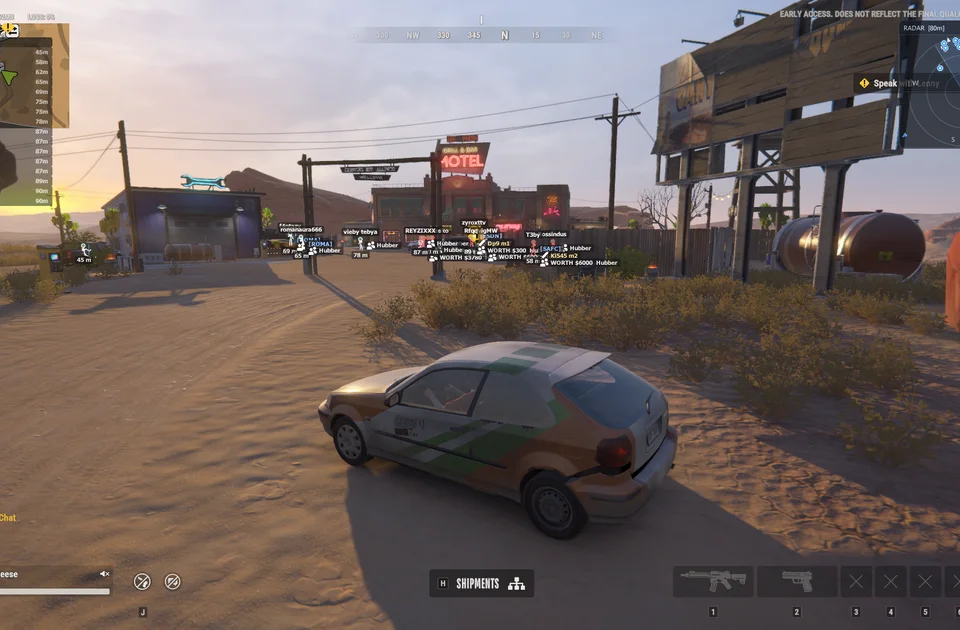
A full Rob Run server can put dozens of characters on one block, and with every label switched on your screen turns into a pile of text. Our community asks about this a lot, so here at AimRobRun we put together the preset our own staff run when a lobby is crowded. Below you will find what each Visuals option does, which ones to cut first, and two odd-looking behaviours that are completely normal.
Why Crowded Servers Need a Different Setup
On a busy server, too much information slows you down, because you read labels instead of moving. The trick is simple: decide which three or four details change what you do next, show those, and hide the rest until things calm down. For most robbers that means role, distance, held weapon and a status tag.
What the Player ESP Can Draw
Here is the full menu for each player:
- Box or Head Dot - outlines a body or marks only the head.
- Skeleton - a stick figure joining head, neck, chest, spine and pelvis, with shoulders, elbows and hips added.
- Name and Clan Tag - who they are and which group they run with.
- Role - Cop, Robber, Citizen or Settler.
- Held Weapon - the gun or tool currently out.
- Distance and Look Line - how far away they stand and where they are facing.
- Movement State - sprinting or crouching.
- Armor Bar - the protection they still have.
- Cargo Pill - shows they are carrying cargo.
- Status Tags - CUFFED, SURRENDER, DOWNED, IMMUNE, plus reload time left, bribe coins carried and WORTH $x (item in hands plus cargo).
One thing missing on purpose: other players' health. Rob Run does not send it to your PC, so no external tool can display it. Armor is the closest stand-in.
Boxes or Skeleton: Picking a Drawing Style
You get three box styles and an optional skeleton:
- Corner Box - only the corners are drawn. Our pick for busy streets, because many players can stand close without the lines merging. At night the thin strokes can be harder to spot, so choose a bright colour.
- 2D Box - a full rectangle. Easy to judge distance from, but in a small room the rectangles stack on top of each other.
- Box Fill - a shaded rectangle. Good for picking out one player far away, too heavy when a crowd is close.
- Skeleton - cleaner than boxes indoors, since limbs overlap less than rectangles and you can see which way someone is facing. At long range the bones shrink into a smudge.
Our staff usually run corner boxes all the time and bind the skeleton to a key for store and motel fights. For nearby players, both the box and the bones are built from the same 3D model the game itself renders, so they sit tight on the character. The 3D Native Skeleton option is marked risky inside the menu, and we leave it switched off.
ESP Responsiveness: Smooth or Snappy
This slider starts at 1.0. Push it higher and boxes chase fast movement more quickly but wobble a little. Pull it lower and motion gets calmer while lagging slightly behind a sprinting player. With thirty boxes on screen, that wobble adds up and gets tiring, so on crowded servers we sit a touch under 1.0. Players who spend most of their time in car chases may prefer the opposite.
Server load does not slow the overlay. A background reader refreshes players, cars and loot about every 10 ms, and drawing happens at your full frame rate from that data. The only thing a busy screen slows down is you.
Visibility Colors: Treat It as a Hint
With Visibility Colors on, a player behind cover changes to a second colour. Behind the scenes, two traces run from your view toward the head and the chest, tested against walls and buildings that never move. A player is flagged hidden only if both traces hit something. Chain-link, windows and slim objects are often absent from that static map data, which means a robber crouched behind a wire mesh may keep the "in view" colour. The menu lists this feature as partly working, and we would not make a call on colour alone.
Two Behaviours That Look Like Bugs
Far boxes that trail behind. A distant player's box sometimes lags and then jumps ahead. At long range Rob Run has not built that character's model on your PC, so the overlay falls back on network updates from the server, which come in small jumps rather than a smooth stream. Once they come closer and the model loads, the box locks on properly. Raising Responsiveness will not remove this.
A skeleton floating above a car. That is a passenger. Where the game places a seated character and where the vehicle body is drawn can differ by a little, so the bones hover. For a clearer read, use the vehicle label from the World tab, which lists the driver and every occupant with their role and weapon.
The Distance Slider and the esp-range Line
You can drag Max ESP distance anywhere between 20 and 2000 m, though the menu tags it as untested. The real cap comes from Rob Run, which only streams nearby people and cars to you, typically within about 150 to 200 m. Cranking the slider to the top reveals nobody new. For the honest number on your server, look inside RobRun_external_log.txt (it sits beside the program) for the "esp-range:" entry, which notes the most distant player and vehicle you actually got. On crowded servers we drop the slider to roughly 150 m anyway, since labels you cannot act on only add clutter.
Battle Mode: One Key for Gunfights
The moment shooting starts, anything that is not a person is noise. Battle Mode strips the screen down to people and occupied vehicles; loot labels, markers, cameras and the roulette panel all vanish until you turn it off. A red "BATTLE MODE" label appears so you do not forget it is active. Give it a key in the Hotkeys tab, press it as you walk into a bank or start chasing cargo, and press it again once the street is quiet.
Our Crowded Server Preset
- Corner box with name, role, distance and weapon.
- Status tags and WORTH on, bribe coins off.
- Skeleton on a hotkey for indoor fights.
- ESP Responsiveness slightly below 1.0.
- Visibility Colors on, used as a hint only.
- Max distance around 150 m.
- Battle Mode on its own key.
- Save Config so it loads next time.
For threats behind you, add the Rob Run radar. Item clutter has its own fix, explained in the rarity colour post by our staff.
What ESP Will Never Show
Everything on screen comes from data the game already hands your client. So you will never see a stranger's health, a locked trunk on somebody else's car, or the modules a player fitted to their house. Keep the risk side in mind too: every cheat can lead to a ban, and turning to face people through solid walls is the habit that draws reports fastest. The complete visuals list sits on our ESP page, and the short version is in the ESP FAQ.